
Samsung Galaxy Book 4 Pro: Samsung's Best Windows Laptop?
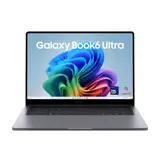
The Samsung Galaxy Book 4 Pro is Samsung's newest attempt to shine in the world of Windows laptops. With an impressive 16-inch OLED display, a powerful Intel Core i7 processor and solid build quality, it looks like a serious alternative to the popular MacBooks. But how does it hold up in everyday use? Is it really Samsung's best Windows laptop? In this article, we look at the different aspects of the Galaxy Book 4 Pro and see whether it lives up to the high expectations.
The OLED display offers vivid colours and a high resolution, ideal for multimedia use.
Build quality is excellent, though there are some weak points in the display hinges.
Performance is strong, though not class-leading.
Battery life is good, but could be better under heavy use.
Value for money is acceptable, but there are cheaper alternatives with similar performance.
Design and build quality of the Galaxy Book 4 Pro
Materials and feel
The Samsung Galaxy Book 4 Pro impresses with premium materials that make themselves felt immediately.
The chassis is made of aluminium
which not only gives it an elegant look, but also a pleasant feel. The surface feels smooth and has a slight coolness to it, giving the laptop an
exclusive
touch. This choice of materials also contributes significantly to the device's durability.
Build quality and rigidity
The build quality of the Galaxy Book 4 Pro leaves little to be desired. All the parts fit together precisely, with no visible gaps or uneven transitions. The hinge is sturdy and allows the laptop to be opened and closed easily, without the screen wobbling. Even under stronger pressure, the device stays rigid and shows no signs of flexing, which points to a well thought-out construction.
Design features and aesthetics
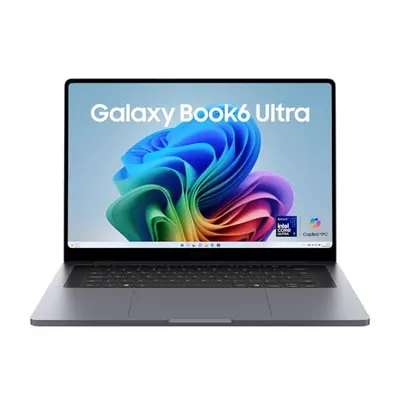
Visually, the Galaxy Book 4 Pro is a real eye-catcher. With its slim profile and clean lines, it looks modern and timeless at once. The minimalist design does away with unnecessary detail and focuses on the essentials. Particularly notable is the narrow bezel around the display, which gives the laptop an almost bezel-less look and boosts its visual appeal. This design makes the Galaxy Book 4 Pro a stylish everyday companion.
The Samsung Galaxy Book 4 Pro combines first-class materials with thoughtful build quality and an appealing design that convinces both functionally and aesthetically.
Display quality and user experience
The OLED display in detail
The heart of the Galaxy Book 4 Pro is undoubtedly its OLED display. With a resolution of 2880 x 1800 pixels and a 16:10 aspect ratio, it delivers impressive picture quality.
Colours are vivid and contrast is sharp
which really comes into its own when watching HDR content. Thanks to
Dynamic AMOLED 2X
technology, blue light output is reduced, which is easier on the eyes and makes longer work sessions more comfortable.
Touchscreen functionality
The touchscreen on the Galaxy Book 4 Pro isn't just a nice extra, it's a genuine benefit. It makes the device intuitive to use, whether you're browsing the internet or editing documents. Being able to zoom and scroll with your fingers is particularly handy, and significantly improves the overall experience.
Outdoor use
Even in direct sunlight, the display stays easy to read. Brightness of up to 500 nits means content is displayed clearly outdoors too. Another highlight is the
Vision Booster
feature, which automatically adjusts contrast to optimise readability. That makes the Galaxy Book 4 Pro a reliable companion wherever you happen to be.
Performance and hardware of the Galaxy Book 4 Pro
Processor and graphics performance
The Galaxy Book 4 Pro is fitted with an Intel Core Ultra 7 processor that reaches clock speeds of up to 4.8 GHz.
This performance is more than enough for most everyday tasks
and also offers enough power for more demanding applications. The integrated graphics are based on Intel Arc 8 Xe Cores, delivering a smooth visual experience even without a dedicated graphics chip.
Memory and storage options
The laptop is available with 16 GB or 32 GB of LPDDR5X RAM. It's worth noting that the memory is soldered in place and can't be upgraded later. Storage comes in the form of a fast 512 GB NVMe SSD, with the option to add a second SSD, as there are two slots available. Being able to double the SSD capacity out of the box would be welcome, especially given that Samsung itself is one of the leading SSD manufacturers.
Cooling and noise levels
One notable aspect of the Galaxy Book 4 Pro is how quiet it manages to stay. The fan only kicks in for intensive tasks, such as gaming or heavy computation, and settles down again quickly. This makes for a pleasant working environment, as distracting noise is kept to a minimum. The cooling is efficient enough to keep components at an optimal temperature without overly affecting battery life.
Overall, the Galaxy Book 4 Pro offers a well-balanced combination of performance and efficiency that should be more than enough for most users. The hardware is well matched, resulting in a reliable and pleasant user experience.
Battery life and portability
Battery life in everyday use
The Samsung Galaxy Book 4 Pro impresses with strong battery life.
Depending on how you use it,
the device can offer up to 21 hours of video playback. This kind of stamina is especially useful for frequent travellers or anyone often on the move without easy access to a power socket. Of course, actual battery life depends heavily on how the device is used. Heavy web browsing or running demanding programs will shorten it accordingly.
Weight and portability
At just 1.2 kg, the Galaxy Book 4 Pro is
remarkably light
making it perfectly suited to life on the move. It slips easily into a bag and barely registers while you're carrying it. This lightness, combined with its slim design, makes it an ideal companion when you're out and about.
Charging times and fast charging
Charging the Galaxy Book 4 Pro is efficiently designed. In just 30 minutes, the battery already reaches up to 35% capacity. That's enough to keep working for several hours, which is particularly handy if you only have a short time to charge. A full charge takes a little over two hours, but that's a fair trade-off for the battery life on offer.
Despite heavy use, the Galaxy Book 4 Pro remains a reliable companion throughout the day, without you constantly having to hunt for a power socket. The combination of long battery life, low weight and fast charging makes it one of the best models in its class.
Ports and connectivity
Available ports
The Samsung Galaxy Book 4 Pro scores points with a wide range of ports, making it a versatile companion.
Particularly worth mentioning
are the two USB-C ports with Thunderbolt 4 support, which allow fast data transfer and connecting 4K displays. There are also two USB-A 3.2 Gen1 ports, useful for older peripherals. An HDMI port allows easy connection to monitors and TVs, while the microSD card reader offers additional storage.
Wireless connectivity
When it comes to wireless connectivity, the Galaxy Book 4 Pro is right up to date. It supports Wi-Fi 6E, ensuring a stable, fast internet connection. Bluetooth 5.2 provides
smooth
pairing with other devices such as headphones or speakers. These features make the device ideal for use in a home office or on the go.
Expansion options
If storage space ever runs low, the Galaxy Book 4 Pro's microSD card reader offers an easy way to expand it. For larger storage needs, you can contact an authorised service partner to have the internal storage expanded. This is particularly handy for users who want to store a lot of data locally without relying on external hard drives.
The Samsung Galaxy Book 4 Pro offers an impressive range of ports and connectivity options suited to both everyday use and professional applications. This flexibility makes it an excellent choice for anyone looking for a powerful, versatile laptop.
Audio and video quality
Speakers and sound quality
The sound quality of the Samsung Galaxy Book 4 Pro is a bit of a mixed bag.
The built-in AKG Quad Speakers
made up of two subwoofers and two tweeters, deliver a solid sound at medium volume. But turn the volume up, and they tend to crackle and lose clarity. Another downside is that the speakers fire downwards, which significantly affects sound quality when the laptop is used on a table. A few points worth bearing in mind:
The speakers aren't ideal for loud environments.
Dolby Atmos can be switched on, but doesn't always improve sound quality.
For music lovers, an external speaker could be the better choice.
Overall, the sound is fine for everyday tasks, but you might expect more from a premium device.
Webcam and microphone
The Galaxy Book 4 Pro's webcam has a resolution of 1080p. It's perfectly usable for video calls and online meetings, especially in good lighting. That said, it lacks any standout features that would set it apart from the competition. Audio is picked up clearly by the built-in microphone, though background noise filtering could be better. A few details:
The camera doesn't offer any exceptional effects, but is fine for standard use.
The microphone works well for normal voice recordings, but may struggle in noisy environments.
A software solution to improve audio quality would be a welcome addition.
Video calls and streaming
The Galaxy Book 4 Pro performs solidly for streaming and video calls. Thanks to a stable internet connection and capable hardware, streaming content in high quality is possible. That said, there are a few things to bear in mind:
A stable Wi-Fi connection is essential for smooth, stutter-free streaming.
Webcam picture quality can suffer in less-than-ideal lighting.
For professional video calls, an external camera could be an advantage.
In summary, the Samsung Galaxy Book 4 Pro offers a solid foundation for audio and video quality, but there's room for improvement, particularly when it comes to sound quality and webcam features.
User experience and software
Operating system and pre-installed software
The Samsung Galaxy Book 4 Pro runs on Windows 11, offering a familiar environment for many users. Windows 11 brings a number of new features that make working more efficient. Alongside the operating system, several Samsung apps come pre-installed to help make the most of the device. These include Samsung Flow, for seamless connection with other Samsung devices, and Samsung Notes, ideal for quick note-taking.
Some users, however, might find the sheer number of pre-installed programs unnecessary
as they take up storage space without adding much value.
Usability and controls
The Galaxy Book 4 Pro is very user-friendly. The device offers an intuitive interface suited to both Windows newcomers and experienced users. The large touchpad and backlit keyboard with several brightness levels in particular make it easy to use. The touchpad is precise and responds quickly to input, making it easy to navigate menus. There may be a small learning curve when it comes to Samsung's own software, but overall the device is straightforward to use.
Security features and updates
When it comes to security, the Galaxy Book 4 Pro offers a number of useful features. Windows 11 comes with built-in security measures such as Windows Defender, which provides solid baseline protection against viruses and malware. The device also supports biometric login via Windows Hello, offering a quick and secure way to unlock it.
Regular updates
keep the system up to date, both in terms of security and functionality.
The Samsung Galaxy Book 4 Pro impresses with a successful combination of usability and powerful software. It's a laptop that holds its own both in everyday life and in a professional setting.
Value for money on the Galaxy Book 4 Pro
Comparison with competing products
The Samsung Galaxy Book 4 Pro positions itself in a fiercely competitive market, going up against other premium laptops.
At a price of around €1,899 to €2,499,
it sits at the upper end of the price range. Compared with similar devices from Dell or HP, though, it offers some exclusive features such as the OLED display and comprehensive Thunderbolt 4 connectivity. Performance is solid, even if it trails class leaders like the Acer Swift Go in some benchmarks.
Long-term investment and value retention
When buying a laptop,
value retention
plays a decisive role. The Galaxy Book 4 Pro scores well here thanks to its high-quality build and use of durable materials. Samsung's long-term software update support helps keep the device current well into the future. Resale value is also relatively stable, making it a sensible investment.
Recommendation and target audience
So who is the Galaxy Book 4 Pro suited to? It's primarily aimed at professional users and creatives who need a reliable, powerful device. It's ideal for anyone who travels a lot and wants a lightweight yet capable notebook. If you're primarily after a gaming laptop, though, you might be better served by other models. All in all, the Galaxy Book 4 Pro offers good value for money for those willing to pay a bit more for quality and features.
Conclusion
The Samsung Galaxy Book 4 Pro is an impressive piece of technology with plenty of strengths, but also a few weaknesses. The brilliant AMOLED display and strong performance are definite highlights that make both work and play enjoyable. That said, there are also some downsides, such as the underwhelming speakers and slightly awkward touchpad. Overall, the Galaxy Book 4 Pro is a solid Windows laptop that could be a good choice for many users, though not without some compromises. If you're after a powerful, versatile device, it's definitely worth considering, but you should also be aware of the weaknesses mentioned above.
Frequently asked questions
How long does the Samsung Galaxy Book 4 Pro's battery last?
The Samsung Galaxy Book 4 Pro's battery lasts around 10 hours under normal use. Actual battery life can vary depending on how it's used.
Can I upgrade the memory on the Galaxy Book 4 Pro?
No, the memory on the Galaxy Book 4 Pro is soldered in place and can't be upgraded.
Is the Galaxy Book 4 Pro suitable for gaming?
The Galaxy Book 4 Pro isn't primarily designed for gaming, but it can run games with moderate requirements. For serious gaming, dedicated gaming laptops are a better fit.
How heavy is the Samsung Galaxy Book 4 Pro?
The 14-inch Samsung Galaxy Book 4 Pro weighs around 1.2 kg, making it light and easy to carry.
What ports does the Galaxy Book 4 Pro offer?
The Galaxy Book 4 Pro has HDMI 2.1, USB-C with Thunderbolt 4, a microSD card reader, USB 3.2 and a 3.5 mm headphone jack.
Does the Galaxy Book 4 Pro have a good webcam?
The Galaxy Book 4 Pro's webcam is fine for video calls, but doesn't offer exceptional picture quality.